
We've vibe-coded our first internal app. How do we give it at least basic security?

The first version of an internal app now takes an afternoon. A simple kit (GitHub, tests, Infisical, Proxmox, MikroTik, Cloudflare, monitoring, backups) gives it basic order and security without building a data centre.
These days, the first version of an internal app can genuinely be built in an afternoon. That's not an exaggeration.
Sure, before it becomes something the whole company actually uses, you'll usually spend far more time polishing it. Reality tends to be longer than the first demo.
But it's still a change.
Not long ago, you'd write a request for a tool like this and wait weeks or months. Today you open an AI, describe the problem, and a little while later you have something that already works pretty well.
And this is often where the second part of the story begins.
The app works. Now what?
- Where does it actually run?
- How does a new version get deployed?
- Where are the passwords?
- Who has access?
- Is the app exposed to the internet somewhere?
- What is the AI allowed to do?
- And what happens when something breaks?
This isn't an article for companies with ambitions to build the next unicorn. It's more for CEOs and owners of small and mid-sized companies who have already vibe-coded something with AI and are now asking themselves:
"OK. Do we maybe have this whole thing a bit wrong?"
Honestly? Maybe a bit. And that's normal.
We got here gradually, together with our clients. Some of them were far faster with vibe coding at the start than we could have imagined. So part of it got tidied up in hindsight. We don't have all the answers.
But over time, a fairly simple building kit emerged from it. One that gives internal apps basic order and security without forcing you to build a data centre for a single app.
And that's exactly what this little series is about.
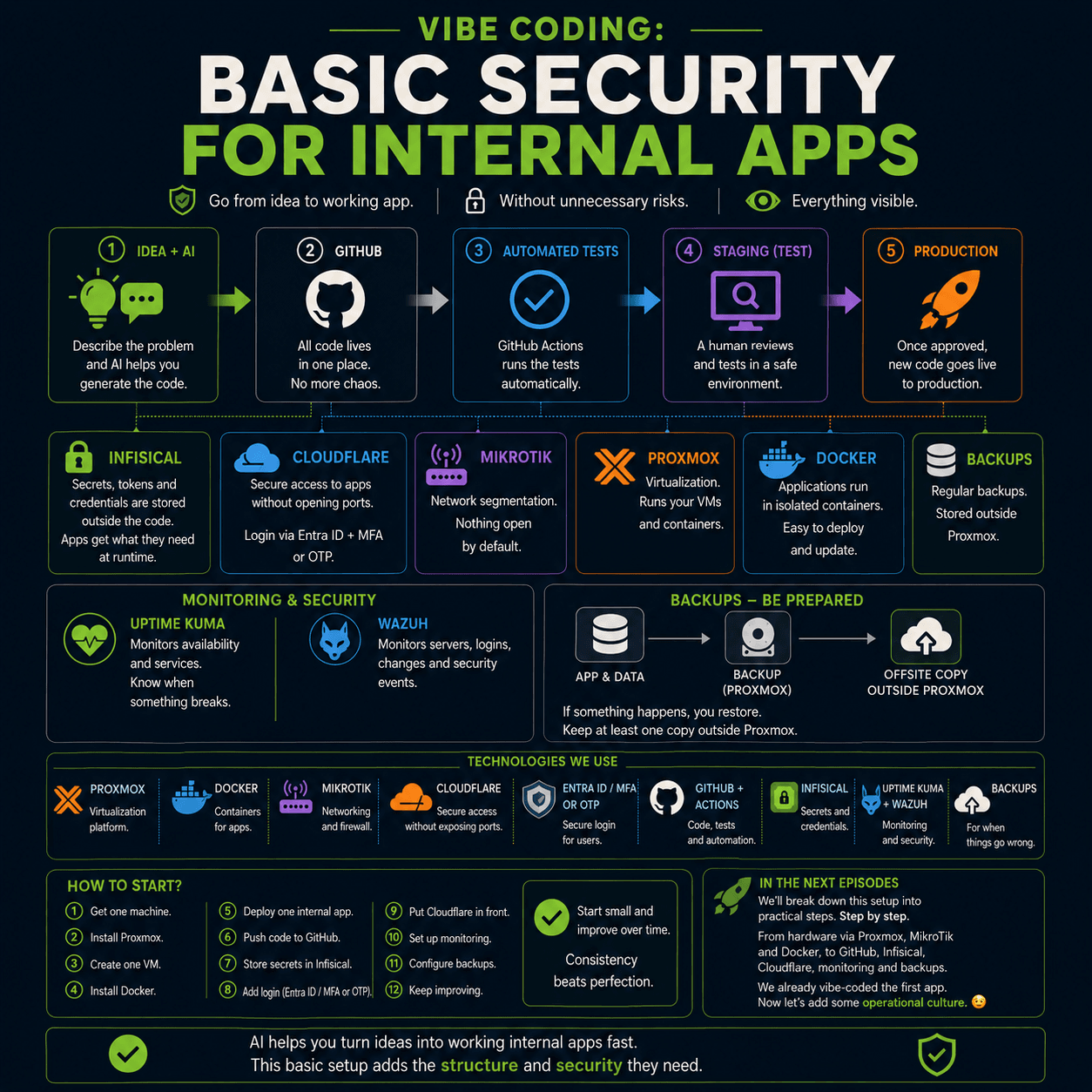
1. One version of the truth: GitHub
All the code lives in one place. For us, that's GitHub.
If it isn't in Git, it doesn't exist.
Not out of some academic developer purity. Simply because you want to know:
- what exactly is running,
- what changed,
- who changed it,
- and how to roll back if needed.
And one important rule: nobody edits code by hand on the production server. Not "just one line". Not "just quickly, this once".
Once you start fixing things directly on the server, you can very quickly end up with two versions of reality. One in GitHub. The other somewhere in production. And you'll discover the difference between them, of course, the moment something stops working.
2. Development → test → production
We don't send new code straight to users. We have a simple path: development → test → production.
Nobody copies code to the server by hand. GitHub Actions takes care of deployment. Before a change reaches production, it has to:
- pass the automated tests,
- be tried out by a human on the test environment,
- be approved for deployment by someone.
Not because we enjoy inventing processes. But because when AI can build something very fast, we want an equally simple brake for the case where it breaks something very fast.
3. Passwords and access: Infisical
This is the thing I'd check first, if anything. Do you have, somewhere in the code:
- a database password,
- an API token,
- credentials for some service,
- a
.envfile with production credentials that someone accidentally forwarded?
We use Infisical for this. It's a vault for passwords, tokens and other sensitive data. The app fetches what it needs at startup. The code doesn't have to contain it.
And the AI doesn't need to know the real values. It only needs to know that the app, say, needs access to a database.
When you later need to change a credential, you do it in one place. Not by searching five files and wondering where else you used it.
4. AI can help. But it doesn't need access to everything.
While we're setting up an empty server, AI can help quite a lot:
- create the environment,
- set up Docker,
- prepare monitoring,
- propose and run the necessary commands.
But once real production data and sensitive information land on the server, the AI's direct access ends.
Because "let the AI at least look at the logs" sounds fairly innocent. Except one unfortunate command can reveal far more than you expected.
From that point on, the AI proposes commands. A human reviews and runs them.
5. And where does it all run?
Here's the good news. You don't need to buy a server for a fortune or build your own data centre.
At the start, you can simply take an older computer you already have. Install Proxmox on it. Proxmox lets you split one physical machine into several separate virtual servers. Your apps then run on those, typically in Docker.
We have our own hardware and a Proxmox cluster in a data centre. But we have our reasons for that, and other things run on it too. For a small internal app used by a handful of people, that would be overkill.
Start simple. Check that the whole approach makes sense for you. Only then worry about bigger iron.
6. And the network? MikroTik.
Alongside Proxmox, it helps to have something that holds the network together. For us it's a cheap MikroTik, or anything from FortiGate and the like.
That's where we handle the network and its separation (segmentation). The test environment doesn't need to see into production. One app doesn't automatically need to talk to everything else.
And above all: you don't need to expose everything to the internet.
7. Cloudflare: if the app is internal, keep it internal
This is where Cloudflare Tunnel makes a lot of sense for us.
- The server doesn't need a public IP address.
- You don't need to open public ports for the app.
- The server establishes the connection outbound.
- And users only get to what they actually need.
If you use Microsoft 365, signing in via Microsoft Entra ID with MFA makes sense (we've written separately about what most often goes wrong with MFA). For a simpler internal app, a one-time code (OTP) can be a reasonable alternative.
The main principle is simple: if it's an internal app, it shouldn't be open without a login.
And the argument "nobody knows that address anyway" is not a security strategy.
Because your app will have bugs
That's not a criticism of AI. It's reality.
When you build an app with AI and you're not a professional development team with a security department, there will probably be some bugs in there. We have them too.
That's why I'd be careful with the moment of: "It works. Let's make it public."
Is it an internal tool? Then keep it internal. And what your company already exposes to the outside world, our free online security audit will show you in a few minutes.
8. How do you know it all still works?
For app availability, we use Uptime Kuma. When an app goes down, we want to know before the users do.
For watching over the servers, we use Wazuh. It tracks things like logins, changes in the system and security events.
Just one important note:
Monitoring that nobody watches is just decoration.
9. And of course, backups
The moment an internal app genuinely starts saving you time, start backing it up. Proxmox has its own tools for that.
Ideally, though, keep at least one copy outside Proxmox itself. Because a backup stored in the same place as the thing you're backing up may not help much when a bigger problem hits.
10. So what do you actually need?
Surprisingly little to start with:
| What | What for |
|---|---|
| Older hardware | No need to buy a new server right away. |
| Proxmox | Virtual servers. |
| Docker | Where the apps run. |
| MikroTik | Network and separation of environments. |
| Cloudflare | Access without needlessly exposing servers to the internet. |
| Entra ID / MFA or OTP | User sign-in. |
| GitHub + GitHub Actions | Code, tests and deployment. |
| Infisical | Passwords, tokens and sensitive data. |
| Uptime Kuma + Wazuh | Availability and security monitoring. |
| Backups | Because everything fails eventually. Ideally off-site too, and better still immutable (undeletable). |
And above all: you don't have to build it all at once.
- Take one computer.
- Set up Proxmox.
- Create one VM. Put Docker in it.
- Build one internal app.
- Put the code in GitHub.
- Put the sensitive data in Infisical.
- Keep the app internal. Add a login.
- Set up a backup.
- Only then add more things.
Vibe coding lets you move really fast. A bit of basic order then helps make sure the quick prototype doesn't turn into an app everyone's afraid to touch.
In the next episodes
We'll break this setup down in practice. Step by step. From hardware through Proxmox, MikroTik and Docker to GitHub, Infisical, Cloudflare, monitoring and backups.
Because we've already vibe-coded our first app. Now let's give it a bit of operational discipline.