Using Microsoft 365? Watch out for THIS
You probably know that Microsoft holds an extensive collection of security certifications. That's great — with the classic BUT... The default settings aren't ideal — and this one is downright dangerous!
You probably know that Microsoft holds an extensive collection of security certifications. That's great — with the classic BUT...
The default settings aren't ideal — and this one is downright dangerous!
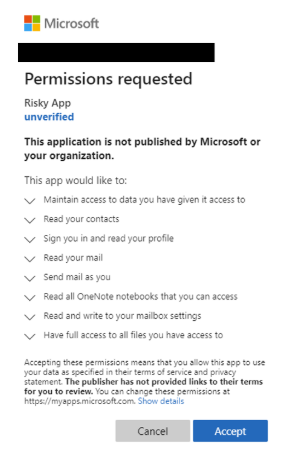
Approving an external app's request to access your data in M365
An attacker doesn't need to steal anything and ends up with near-permanent access to your data without anyone realizing. By default, the user grants that access themselves...
You might be thinking: why on earth — I'm not gullible enough to do that. But...
A lot of apps and plugins require what's called application consent to access your data. And it's often a legitimate request — you probably know Calendly, which needs access to your calendar to schedule meetings online. By default a regular user can approve this — and that's where the problem is. Users don't really read or think about what they're approving.

Imagine I built an AI app that, as a bonus for our newsletter readers, ran a FREE security check of your M365 environment (and as part of that bonus, requested access to your mail and data). The dialog wouldn't look particularly scary, and the user would approve it. From that moment on I can do almost anything 🙂. AI is hot right now, employees want to score points for trying AI — that lands somewhere 😉.
What to do?
Restrict the app-consent permission so only selected administrators can approve. They'll get a notification that user XY wants to install an app requiring this list of permissions. It's then up to the admin to decide whether it's OK or not.
P.S. Useful links are in the first comment.